


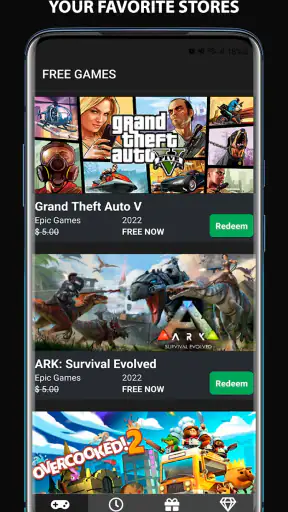
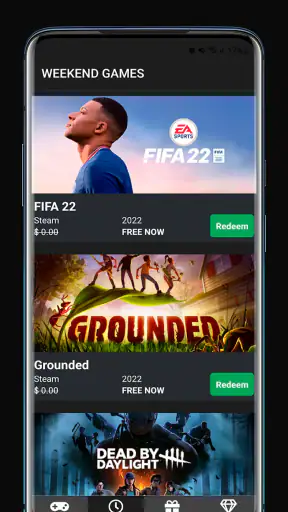
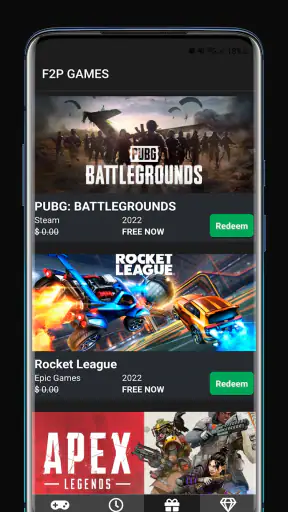
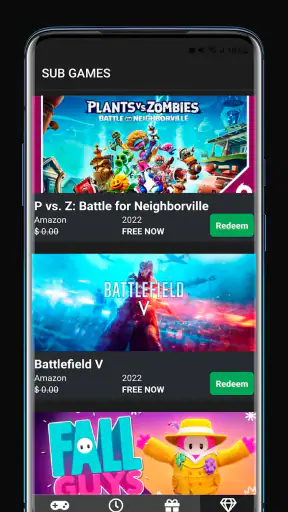
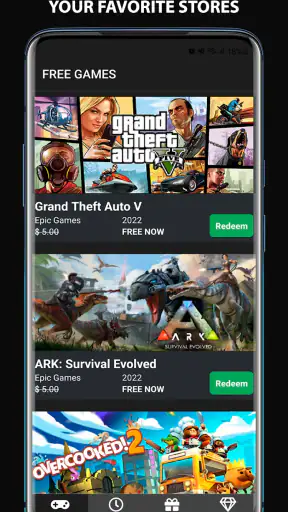
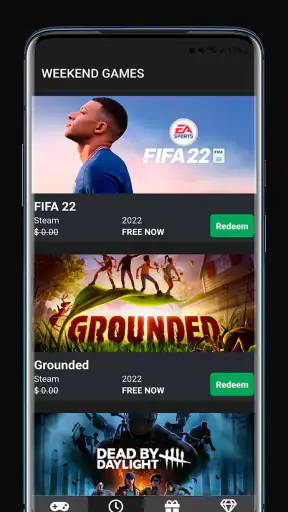
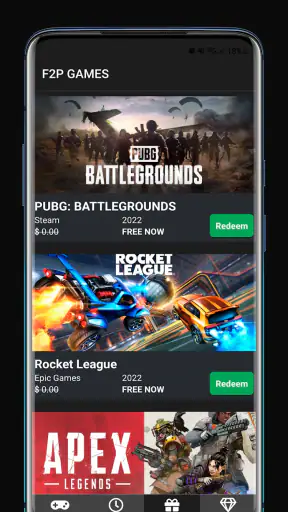
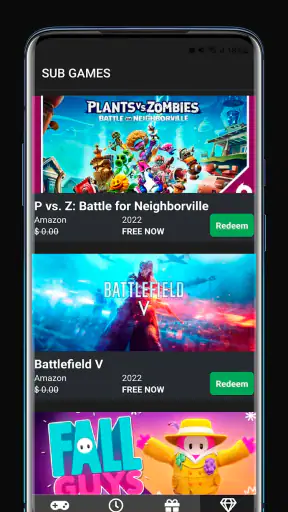
If you regularly check several game stores for limited-time giveaways, Epic Freebie Games Radar is built around one very practical idea: bring those free offers into one place so you do not have to remember where to look. I found that its value is less about playing games inside the app and more about reducing the effort between hearing about a giveaway and claiming it from the relevant store. That narrow focus is also what makes it easy to understand.
This is a free events app from Arioch Pds - Apps & Games, aimed at people who follow free PC game promotions across services such as Epic Games, Steam, Amazon and Rockstar. It is rated for Everyone, works from Android 7.0 onward, and has reached over five million installs. Its average score is 4.4 from around twenty-three thousand ratings, which suggests that the simple tracking concept appeals to a broad audience.
One radar for changing game giveaways
The central capability is the monitoring of freebie games. Instead of treating every store as a separate destination, the app gives me a single place to check which promotions deserve attention. That matters because giveaways are easy to miss when they are mixed with ordinary store news, sales and new releases. A dedicated freebie view keeps the useful question in front of me: what can I claim without paying right now?
I would describe it as an event-tracking tool rather than a game launcher. It does not replace the stores where ownership is actually added, and it is not intended to organize my installed library. Its job is to help me notice opportunities. That distinction is important because someone looking for cloud gaming, a social gaming community or a full game-management app may find the experience too limited.
The store summary mentions freebie games from several major platforms, while the short description presents it simply as “Epic Freebie.” In practice, that positioning makes sense: Epic is the obvious starting point, but the wider store coverage is what gives the app more value than checking one source alone. I can use it as a quick sweep across different ecosystems, especially if I have accounts on more than one of them.
Why a single alert point changes the routine
The real benefit is not merely seeing a list. It is changing the habit from scattered checking to a repeatable routine. I can open the app when I have a spare moment, scan the current offers and then decide whether one is worth claiming. That is quicker than opening several store apps, navigating through promotional sections and trying to remember which deals I already investigated.
There is also a useful psychological effect: the app turns an easy-to-forget opportunity into a visible event. Free promotions often have a limited window, so the cost of missing one is not money spent but an opportunity that disappears. A radar-style tool is helpful precisely because it keeps those temporary offers separate from the noise of ordinary shopping.
Still, I would not treat every entry as an automatic recommendation. “Free” does not mean every game suits my taste, storage space or available time. I use the app as a discovery and reminder layer, then make the final decision in the relevant store. That extra step is healthy because it keeps the app from becoming a substitute for checking the actual claim conditions.
How I use it without turning giveaways into clutter
My preferred workflow is short. I open the app during a weekly gaming check, look for newly available freebies, and inspect the platform attached to each one. If something interests me, I continue to the appropriate store and claim it there. I then ignore the rest rather than treating the entire feed as a task list.
That workflow is especially useful for people who collect games for later. I often claim a title even when I do not plan to install it immediately, because the important action is securing the offer while it is available. The app makes that decision easier by putting the discovery step in one place. It does not require me to be ready to play before I decide whether a giveaway is worth claiming.
A less obvious advantage is that cross-store coverage helps reveal where my attention is uneven. I might check Epic frequently but forget Amazon or Rockstar entirely. Seeing those sources together encourages a more balanced routine. The trade-off is that the wider view can also produce offers for platforms I rarely use, so I still need to filter mentally.
I also recommend checking the app before planning a weekend gaming session rather than only opening it when I am bored. That small change makes the radar more useful: I can claim a suitable title in advance, install it later and avoid discovering the promotion after it has ended. For a household with several players, the same approach can help identify inexpensive ways to expand a shared backlog, although each person still needs to consider which store account will receive the game.
A realistic evening use case
Imagine I have finished work on Friday and want something new for the weekend, but I do not want to spend time comparing paid releases. I open the app, scan the current freebie entries and find an offer associated with a store account I already use. I check the store page, claim the title and leave installation for later. The whole point is not that the app plays a game for me; it removes the searching that might otherwise make me give up and play something I already own.
Another scenario is a person who follows several launchers but rarely opens them. That user may have enough storage and interest to collect occasional games, yet miss promotions simply because the stores are not part of their daily routine. A central radar gives them a reminder destination. It is most effective when paired with a personal habit, such as checking after dinner once a week.
For someone who only uses one store and already checks its giveaway page regularly, the advantage is smaller. In that case, the store’s own app or website may be faster because it leads directly to the account and claim button. This app earns its place when the problem is fragmented information, not when the problem is access to a single platform.
What the experience gets right, and where it asks for patience
I like the focused design implied by the product. There is no need to learn a complicated game-management system before getting value from it. The purpose is clear from the first use: look for free games and follow the relevant source. That makes it approachable for casual players as well as dedicated collectors.
The broad platform scope is the strongest reason I would install it. A person who uses Epic, Steam, Amazon and Rockstar can otherwise develop four separate checking habits. Combining them makes the app more useful than a single-store bookmark. It also helps me notice promotions outside my usual routine, which is where the discovery value comes from.
However, a central listing is not the same as a universal claim system. I still have to pay attention to the platform, sign in where necessary and complete the claim through the appropriate service. Readers expecting one-tap ownership across every store should adjust their expectations. The app helps me find the offer; the store remains the place where the transaction or account addition happens.
There is another trade-off in the word “freebie.” The app may make a promotion visible, but I still need to judge whether the offer is useful to me. A title can be free and still be unsuitable because I do not use that platform, have no interest in its genre or lack room to install it. I avoid clutter by treating each listing as a prompt for a quick decision, not as an obligation to collect everything.
The app is also less suitable for readers who want deep editorial coverage. Its main strength is timely awareness, not long-form criticism, detailed build advice or a replacement for a game database. When I want to know whether a game is genuinely good for my preferences, I look beyond the radar and read a fuller review. That is not a flaw in its core purpose, but it defines the boundary of what it can do for me.
Because it is an events-focused app, its usefulness depends on the availability and relevance of current promotions. On a quiet day, there may be little reason to open it. I see that as a normal limitation of the category rather than a reason to keep it running constantly. A periodic check is more sensible than expecting a new discovery every time.
Who gets the most from it?
I would recommend it first to multi-platform PC players, bargain hunters and people who enjoy building a backlog without paying for every addition. It is particularly helpful if I have repeatedly learned about a giveaway after it ended. The app gives that kind of player a simple checkpoint and reduces dependence on memory.
It can also suit parents or casual players who want to find low-cost entertainment without browsing several stores. The Everyone content rating makes the app itself broadly accessible, although that rating should not be confused with a guarantee that every listed game is suitable for every age. I would still check the individual game before claiming it for a younger player.
Collectors should appreciate the convenience, but they should also create a little discipline. I find it useful to claim only titles I might realistically try or games I would be happy to keep in an account. Otherwise, a freebie tracker can encourage an oversized backlog that becomes harder to navigate. The app solves discovery; it does not solve the personal question of what deserves my time.
I would skip it if I already have a reliable single-store routine, dislike collecting games, or want an all-in-one launcher with installation and library controls. It is also not the right choice for someone who expects detailed recommendations based on play style. Its advantage is breadth and awareness, not personalization or deep analysis.
Version, access and everyday practicality
The current version is 6.5.0, and the app supports Android devices beginning with version 7.0. That makes it viable for many older phones as well as newer hardware. Since it is free, the decision to try it is relatively low-risk, particularly for users who frequently miss limited-time promotions.
I would approach installation with a specific goal rather than vague curiosity: use it as a weekly cross-store giveaway check. That gives me a clear way to judge whether it belongs on my phone. After a few checks, I can tell whether the wider coverage saves time compared with my existing habits. If I never use more than one platform, the app may not add enough to justify another destination on my home screen.
The developer, Arioch Pds - Apps & Games, has kept the concept centered on a recognizable need. The strong user response, reflected in a 4.4 average and more than five million installs, supports the idea that many players want this kind of shortcut. I still value the app for what it does rather than for its popularity: it gives me a practical reminder system for promotions that are otherwise easy to overlook.
My final view is positive, with a clear condition. Use it as a giveaway radar, not as a replacement for the stores or for thoughtful game selection. When I check several platforms, its single-screen approach saves time and makes limited offers easier to catch. When I use only one store or want rich game recommendations, the usual store app and dedicated review sources are better. For the right player, though, this small Events app turns a scattered search into a manageable weekly habit, and that is a genuinely useful improvement.


